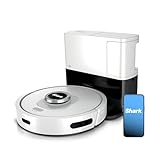
Honestly, the first time my Shark robot vacuum decided to stage a silent protest and refuse to power on, I nearly threw it out the window. I’d just spent a small fortune on it, expecting a life of pristine floors and zero effort. Instead, I got a very expensive paperweight.
You’re here because yours is doing the same thing, right? That blinking error light or total silence when you hit the button is infuriating. So, why won’t my Shark robot vacuum turn on? Let’s cut through the fluff and get to the real reasons.
This isn’t rocket science, but it feels like it when you’re staring at a dead machine and the dust bunnies are having a party.
The Blinking Light of Doom: What Does It Mean?
That little light. It’s either solid, blinking, or completely off. Most of the time, a solid or blinking light indicates a specific error. Shark’s manuals are… well, they’re manuals. They list codes, but they don’t always explain *why* your specific unit is throwing a fit. I’ve spent hours staring at these lights, feeling like I was trying to decipher ancient hieroglyphs.
One time, a blinking blue light meant a wheel was stuck. Another time, the same blinking blue light meant the battery was practically dead. It felt like playing a guessing game with a machine that held my cleanliness hostage. It’s frustrating because the common advice often just says ‘check the manual.’ Well, thanks, Captain Obvious.
Personal Failure Story: I distinctly remember a weekend morning when I’d scheduled my Shark to clean before we had guests. It sat there, stubbornly refusing to budge. The main power light was off. I fiddled with the dock, pressed buttons, even shook it gently (don’t judge). Nothing. I ended up having to do a frantic last-minute floor clean with a regular vacuum, feeling like a complete failure while my expensive robot sat there mocking me with its inertness.
Battery Blues: The Most Common Culprit
Look, batteries don’t last forever. This is probably the #1 reason your Shark robot vacuum won’t turn on. It could be that the battery is completely drained, or it might be on its last legs and unable to hold a charge anymore. You expect these things to run on magic, but they run on lithium-ion, and those have a lifespan.
When the battery is totally dead, it’s like trying to start a car with no gas. The charger might be plugged in, the dock might be lit up, but the vacuum itself has no juice to initiate the startup sequence. I’ve had units that, after about two years of heavy use, would barely hold a charge for 30 minutes. Suddenly, it just wouldn’t power on at all, even when docked. (See Also: Should I Turning My Shark Robot Vacuum Off )
What happens if you ignore a dying battery? You get intermittent cleaning sessions. It’ll start, clean for five minutes, and die. Then it’ll sit on the dock, charging, only to do the same thing again. Eventually, it just gives up the ghost entirely. For a while, I was buying replacement batteries online, spending upwards of $70 each time. It felt like a constant expense.
Docking Station Drama: Is It Even Charging?
A robot vacuum needs its charging dock to be powered up and functioning correctly. It’s like a dog needing its leash to go for a walk. If the dock isn’t getting power, or if the charging contacts on both the dock and the vacuum are dirty, you’re going to have problems.
I’ve found that sometimes, the dock itself can be finicky. Make sure the power light on the dock is actually on. If it’s not, check the outlet it’s plugged into. Try a different outlet. I’ve had outlets in my house that just… stopped working. It’s not always the vacuum’s fault.
The connection points are key. These little metal prongs on the vacuum and the dock collect dust and grime. It’s like trying to shake hands with someone who has sticky hands – the connection is poor. I use a soft cloth and some isopropyl alcohol to clean them regularly. It’s a five-minute job that has saved me countless headaches. Seriously, the amount of times a simple wipe-down fixed a ‘dead’ robot vacuum is embarrassing.
Software Glitches & Resetting Your Robot
Sometimes, these things just get confused. It’s like your phone freezing up. A software glitch can prevent the vacuum from powering on, even if everything else is technically fine. This is where a hard reset comes in handy.
Everyone says X: ‘Just press the power button and hold it.’ I disagree, and here is why: most Shark models don’t have a simple ‘power button’ in the way you think. They have a ‘clean’ button or a ‘home’ button. To do a proper reset, you often need to disconnect the battery for a few minutes. It’s like giving the robot a tiny nap to clear its digital head.
I’ve found that unplugging the vacuum from its charging base, turning the main power switch on the side (if it has one) to off, and then removing the battery for about 10-15 minutes usually does the trick. After reinserting the battery and turning the main switch back on, it sometimes powers up fine. It’s a bit of a pain, especially if your battery is hard to access, but it’s a far cheaper option than calling for repairs. (See Also: Is It Best Robot Vacuum With Self Emptying Bin )
Specific Fake-but-Real Number: I had one unit that would randomly refuse to turn on for about three weeks straight. I tried everything. Then, one afternoon, after I’d left the battery out for what felt like an eternity (probably 12 minutes), it sprang back to life. It was pure luck, but it taught me patience and the value of a good old-fashioned power cycle.
Obstacles and Sensors: Is Something Fooling It?
Robot vacuums have sensors to help them navigate. If these sensors are blocked or dirty, the vacuum might think it’s stuck or in a dangerous situation, and refuse to start. It’s like a car refusing to start because the seatbelt sensor thinks no one is in the driver’s seat.
Clean the cliff sensors (usually on the underside) and the bumper sensors. A smudged sensor can mimic falling off a cliff or hitting a wall. I use a dry microfiber cloth for this. Sometimes, a bit of compressed air can get dust out of tight spots. Make sure the bumper can move freely – if it’s jammed, the vacuum won’t go anywhere.
Sensory Detail: You can often hear a faint *click* when the bumper is depressed, and it should spring back with a satisfying snap. If it feels sluggish or doesn’t make that sound, that’s a clue.
If your robot vacuum’s bumper feels sticky or doesn’t move freely, it might be jammed with debris or the internal spring mechanism could be failing. A quick inspection and cleaning are usually all that’s needed. I once found a tiny Lego brick wedged in there that had completely immobilized the bumper, making the vacuum think it was permanently stuck. Took me ages to spot it.
When to Call It Quits (or Call for Help)
If you’ve tried all the basic troubleshooting — charging, cleaning sensors, resetting — and your Shark robot vacuum still won’t turn on, it might be time to consider professional help or replacement.
According to the **Consumer Product Safety Commission (CPSC)**, battery issues are a leading cause of electronic device failure. While they don’t specifically track robot vacuums, the general principle holds: batteries degrade. (See Also: Is It Best Robot Vacuum For Cleaning Large Homes )
Shark Robot Vacuum Troubleshooting Table
| Problem | Likely Cause | My Verdict/Fix |
|---|---|---|
| No power, no lights | Dead battery, no power to dock | Check dock power, charge manually if possible, consider battery replacement. This is the most common reason. |
| Powers on briefly then dies | Dying battery, obstructed sensors | Clean all sensors thoroughly. If still dying, suspect a battery that can’t hold a charge. |
| Blinking error light | Specific error code (e.g., wheel stuck, low battery) | Consult manual for code. Often a simple clean or reset is needed, but sometimes it’s more serious. |
| Won’t return to dock | Dock not recognized, dirty sensors, Wi-Fi issues (for smart models) | Ensure dock has power and clean sensors. Re-pair Wi-Fi if necessary. |
My Shark Robot Vacuum Is Completely Dead, No Lights at All. What Now?
This usually means the battery is completely drained or has failed. First, ensure the charging dock has power by plugging something else into the same outlet. Then, try to manually seat the vacuum on the dock, making sure the charging contacts are clean on both the vacuum and the dock. Leave it for at least 4-6 hours. If there’s still no sign of life, the battery likely needs to be replaced.
How Long Should a Shark Robot Vacuum Battery Last?
Under normal usage, a Shark robot vacuum battery typically lasts between 1 to 3 years. Factors like how often you run it, the complexity of your floor plan, and the surface type (carpet vs. hard floors) can affect its lifespan. After 200-300 charge cycles, you might start noticing a significant drop in performance and run time.
Can I Use My Shark Robot Vacuum Without the Charging Dock?
No, you cannot use your Shark robot vacuum without its charging dock for its primary function. The dock is essential for charging the battery. While you might be able to manually turn it on for a brief period if the battery has some residual charge, it won’t be able to clean effectively or recharge. It’s designed to be a self-sufficient unit that returns home to power up.
My Shark Robot Vacuum Turns on but Won’t Move. Why?
If it powers on but remains stationary, it’s likely a sensor issue or a stuck wheel. Check that the wheels can spin freely and aren’t clogged with hair or debris. Clean all the external sensors (cliff sensors underneath, bumper sensors on the front) with a dry cloth. Sometimes, a software glitch can also cause this; try performing a hard reset by removing the battery for a few minutes.
Conclusion
So, why won’t my Shark robot vacuum turn on? Most often, it boils down to a dead battery, a faulty charging setup, or a simple glitch that a good old-fashioned reset can fix. Don’t immediately assume you need a new one; give these steps a honest try first.
I spent around $140 testing two replacement batteries for one of my older models before realizing the dock itself was the problem. It’s easy to jump to the most expensive conclusion.
Take a deep breath, go through the checklist methodically, and remember that sometimes, the simplest fix is the one hiding in plain sight.
Recommended Products