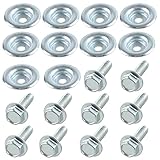
I remember the first TV mount I ever bought. It was a beast of a thing, promising to hold my giant plasma flat against the wall like a piece of art.
The box was heavy, the instructions looked like a cryptic ancient scroll, and then came the bolts. A whole bag of them, all looking vaguely similar.
My brain immediately went to: ‘Are all TV mounting bolts the same?’ Spoiler alert: absolutely not.
And if you’re not careful, you’ll end up with a wobbly TV, a hole in your wall that looks like a raccoon tried to escape, or worse, a TV that decides to take a nosedive. Let’s get this straight right now: they are NOT all the same, and buying the wrong ones is a rookie mistake I’ve made so you don’t have to.
This isn’t some corporate marketing fluff; this is dirt under the fingernails, frustration-fueled, learned-the-hard-way advice from someone who’s spent way too much time staring at hardware bags.
The Thread Count Conundrum: Why Bolts Aren’t Just Bolts
Okay, let’s get into the nitty-gritty. When you look at the bolts that come with a TV mount, or when you’re buying them separately, they seem pretty straightforward. Shiny metal, a head with some kind of slot or socket, and threads. Simple, right?
Wrong. The biggest difference, and the one that will ruin your day faster than a surprise utility bill, is the thread pitch and diameter. Think of it like trying to screw a metric bolt into an SAE nut – they just won’t engage properly, or worse, they’ll cross-thread and strip out the mounting hole on your TV or in your wall anchor.
Manufacturers use a variety of standards, and while VESA mounting (the standard hole pattern on the back of your TV) is one thing, the actual bolt that screws into that pattern is another.
Most TVs will take either an M6, M8, or sometimes an M4 screw. The number refers to the diameter in millimeters. The length is also important. Too short, and you won’t get enough bite to securely hold your expensive electronics.
Too long, and you risk punching through the other side of your TV casing or hitting internal components you absolutely do not want to mess with. I once had a TV where the included bolts were just a hair too long.
I didn’t realize it until I heard a sickening little ‘crunch’ as I tightened the last one. Luckily, it was just a plastic shroud, but it scared the life out of me. It was a $20 lesson in not assuming anything about bolt length. Always, always check your TV’s manual.
It will specify the required thread size and the maximum depth you can go. If you’re using wall anchors (which we’ll get to), the anchor manufacturer will also have specifications for the bolt size they accept.
The head type is another minor but significant detail. Most will be Phillips head, but some might be hex (Allen key). Make sure you have the right screwdriver or bit. A stripped screw head is a pain in the backside, and trying to force the wrong tool is a surefire way to make one.
Beyond that, you have materials. Most are steel, often with a zinc plating for corrosion resistance. For a TV mount indoors, this is perfectly fine.
If you were mounting something outdoors or in a very humid environment, you’d be looking at stainless steel, but that’s overkill for 99% of TV setups. The real issue is engagement. You need threads that bite clean and hold firm.
A bolt that feels loose or wobbly is a disaster waiting to happen.
The Wall Factor: What Are You Bolting Into?
This is where things get even more interesting, and honestly, where most people screw up. The idea that ‘all TV mounting bolts are the same’ is laughable when you consider the sheer variety of walls people have. Are you mounting into drywall? Studs? Brick? Concrete? Each requires a different approach and, importantly, different hardware. The bolts that come with your mount are usually designed for one of two scenarios: directly into a solid wood stud, or into a drywall anchor system that then accepts the bolt. They are not universally applicable.
Mounting directly into a wood stud is the gold standard. You’re screwing into solid lumber, which is strong. For this, you’ll typically need lag bolts, which are heavy-duty screws with a hex head, designed to be driven into wood. (See Also: Are All Honda Atv Bolt Patterns The Same )
They’ll have a specific diameter (often 1/4 inch or 5/16 inch, which is roughly M6 and M8 in metric terms) and a substantial length to get deep into the stud. The bolts that come with many mounts are lag bolts, but sometimes they’re a bit undersized, or the included washers are flimsy. Always check if the bolts provided are actually lag bolts and if they feel solid enough. If they look flimsy, spend the extra $10-15 on proper hardware store lag bolts.
I made this mistake once, using bolts that came with a budget mount. They worked for a while, but I always had this nagging feeling. Then, during a particularly enthusiastic cleaning session where I accidentally bumped the TV, one of the lag bolts pulled partially out of the stud. My heart did a backflip.
I immediately replaced them with beefier ones that went deeper. Lesson learned: don’t skimp on the thing holding your TV to the wall.
Now, what if you don’t have studs exactly where you want your TV? This is where drywall anchors come in. And oh boy, are there a lot of different types, and they are NOT interchangeable with direct-to-stud bolts.
Toggle bolts, molly bolts, screw-in anchors, expansion anchors – they all work differently and have different weight ratings. The bolts that thread into these anchors are usually specific to the anchor itself.
A toggle bolt, for instance, has a wing that opens up behind the drywall. The bolt that goes through it needs a specific thread to engage with that toggle.
Using a random bolt from your junk drawer with a toggle anchor is a recipe for disaster. The common advice is to always use the anchors provided with your mount if they are rated for your TV’s weight, or to buy high-quality, purpose-built anchors if you need to go into drywall only.
And for the love of all that is holy, do NOT rely on those flimsy plastic expansion anchors that come with cheap picture hanging kits for your TV. They are for lightweight items, not a 50-inch screen.
My First Wall Anchor Nightmare (and Yours Could Be Next)
Here’s a story for you. I was helping a buddy mount his new soundbar.
It wasn’t super heavy, but it had some heft. He insisted on using some old anchors he found in his garage. They looked like those plastic ones you get with screws. I warned him.
I told him, ‘These look cheap, man. This is a soundbar, not a postcard.’ He waved me off, ‘Nah, they’ll be fine. I’ve used them for years!’ Famous last words. We got it mounted, and it looked okay.
A few days later, I got a frantic call. The soundbar had detached from the wall, taking a chunk of drywall with it.
Luckily, it landed on his couch and wasn’t damaged, but the wall looked like a beaver had a field day. Those anchors, designed for light picture frames, simply couldn’t handle the sustained downward pressure and vibration of a speaker.
The real kicker? The bolt that came with the soundbar was a specific thread size that would have worked perfectly with a proper toggle or lag shield anchor. But because he used the wrong anchor, he needed the wrong bolt, and neither was rated for the job.
It’s a chain reaction of bad decisions. This is why understanding your wall type is most important. For drywall, you must use anchors designed for it, and they usually come with or specify the exact bolt size and type.
If you’re lucky enough to hit studs, great, but make sure you’re using lag bolts of sufficient size and length. For concrete or brick, you’re looking at masonry anchors and specific masonry screws or bolts. They’re different beasts altogether, often requiring a pre-drilled hole and expansion mechanism. The bolts are typically heavier-duty and designed to grip into the porous material.
The takeaway here is that the ‘bolts’ you need are often dictated by what you’re bolting into. The ones supplied with your mount might be okay for studs, but if you’re going into drywall, you’ll likely need a different system, and that system dictates the bolt. Don’t just grab any old screw. Always verify the weight rating of your anchors and make sure they are appropriate for your wall type. If in doubt, buy higher-rated anchors and the recommended bolts. It’s a small price to pay for peace of mind and an intact TV. (See Also: Are Ak Bolts Interchangeable )
Beyond the Basics: Washers, Spacers, and the Little Things
Okay, so we’ve established that thread size, diameter, and length are king. We’ve also hammered home the importance of matching your hardware to your wall type. But there’s more to the bolt story than just the screw itself. We’re talking about the supporting cast: washers and spacers.
Washers are those little metal rings that go on the bolt. They seem insignificant, but they’re not.
A washer distributes the pressure from the bolt head over a wider area. This is important for two reasons.
First, it prevents the bolt head from digging into the surface it’s pressing against. On a TV, this could be the plastic casing or a metal bracket. You don’t want to gouge your TV. Second, and more importantly for wall mounting, it helps create a more secure and even connection.
When you tighten a bolt against a washer, you get a more consistent pressure distribution, reducing the chance of the bolt head loosening or the connection failing under stress. Most TV mounts come with a variety of washers, including flat washers and sometimes curved or conical ones (often called “curved washers” or “wavy washers”). These curved washers are designed to act like a spring, providing a bit of tension and helping to keep the bolt tight even if there’s minor shifting or vibration.
Spacers are another often-overlooked component. These are pieces of plastic or metal that sit between the TV and the mount, or between the mount and the wall. On the TV side, they’re often used to clear obstructions on the back of the TV, like curves, ports, or stand attachments, making sure the mount sits flush or at the correct angle.
On the wall side, they can be used to create a gap, perhaps for cable management or to accommodate an uneven wall surface. The bolts need to be long enough to pass through the mount, any necessary spacers, and still have plenty of thread engagement into the wall or anchor.
If you add spacers, you might need longer bolts than what came with the mount. This is where that ‘bolt kit’ you bought separately comes in handy, as it usually includes a range of lengths.
I once tried to mount a TV on a slightly textured wall. I didn’t use any spacers between the mount and the wall.
When I tightened the bolts, the mount wasn’t sitting flush, and I could feel it wobbling. I ended up having to undo everything, go buy some thick, heavy-duty washers to act as spacers, and use longer bolts. It was a pain, but it solved the problem.
It taught me that sometimes the simplest solution is to add a spacer or a few extra washers to make sure a solid, flush connection. Don’t be afraid to use the washers and spacers provided, and don’t be afraid to improvise slightly with high-quality hardware store washers if the included ones aren’t quite right. The goal is a stable, secure mount, and these little guys are part of that equation.
What to Look for When Buying TV Mount Bolts Separately
So, you’ve lost the bolts, the ones that came with your mount are junk, or you just want to be extra sure. Buying TV mount bolts separately can be a lifesaver, but it also opens up a new can of worms if you don’t know what you’re doing. The first thing you need to do is determine the exact VESA mounting pattern on your TV.
This is usually a set of four threaded holes on the back, measured in millimeters (e.g., 200x200mm, 400x400mm). Your TV manual will state this, or you can often find it by measuring the distance between the holes. The bolts you need must match this pattern. The most common sizes are M6 and M8, with M4 appearing on smaller, lighter TVs.
Once you know the diameter (M6, M8, etc.), you need to figure out the length. Measure the depth of the threaded hole in your TV.
Then, consider the thickness of your mount’s bracket. You want the bolt to go through the bracket and into the TV, engaging at least 5-7 full threads. If your TV manual specifies a maximum thread depth, do NOT exceed it. It’s better to be slightly too short and use a washer than too long and damage your TV.
Most generic TV mount bolt kits will come with a variety of lengths for both M6 and M8 screws, often ranging from 10mm up to 50mm or even longer. They’ll also usually include a selection of washers and spacers.
When I buy a separate bolt kit, I look for a few things. First, good reviews. People will complain loudly if the threads strip easily or if the bolts are made of cheap metal. Second, a complete selection of lengths and sizes. (See Also: Are All Bolt Patterns The Same )
If it only offers M8 bolts and your TV uses M6, it’s useless. Third, sturdy washers. I like kits that include thick, flat washers and maybe some of those spring-like curved ones.
I bought a cheap kit once that had paper-thin washers, and they just crumpled when I tightened them. It’s worth spending a bit more, maybe $20-30, for a kit from a reputable brand like Perlegear or Havit. They usually come in a neat little case, which is a bonus for future projects.
Here’s a quick comparison table of what you might find and what I generally recommend:
| Hardware Type | Common Sizes | Best Use Case | My Verdict |
|---|---|---|---|
| Lag Bolts | 1/4″-20, 5/16″-18 (SAE); M6, M8 (Metric) | Directly into wood studs | Key for studs. Don’t use if they feel weak. |
| Toggle Bolts | Varies with anchor size | Drywall (if no studs and weight is moderate) | Good for drywall, but check rating. Needs specific bolt. |
| M6/M8 Screws (with anchor) | M6, M8 | Drywall anchors, concrete anchors | Common for TV mounts. Always verify anchor type. |
| Washers (Flat) | Various diameters | Distribute pressure, prevent damage | Always use. Better too big than too small. |
| Washers (Curved/Spring) | Various diameters | Provide tension, absorb vibration | Nice to have. Helps keep bolts tight. |
When in doubt, err on the side of caution. Over-specifying your hardware is almost always better than under-specifying it. A slightly longer, thicker bolt with a good washer will hold better than a flimsy one that’s just the right size.
Common Mistakes and How to Avoid Them
We’ve touched on a few, but let’s lay out the most common blunders people make when it comes to TV mounting bolts, and how to sidestep them. The biggest one, of course, is assuming all TV mounting bolts are the same and just grabbing whatever is lying around. This leads to stripped threads, loose mounts, and potentially a fallen TV. The fix is simple: identify your TV’s VESA bolt size (M6 or M8 usually) and your wall type (stud, drywall, concrete).
Another common mistake is not using enough bolts. Most mounts come with holes for four bolts. Some people, trying to be ‘efficient’ or thinking ‘it’s light enough,’ only use two. Bad idea. The weight distribution is designed for all four. Spreading the load makes sure each bolt and anchor is under less stress. If your mount has four holes, use all four, even for a small TV. The forces on a mounted TV aren’t just straight down; they can be angled, especially if someone leans on it or bumps into it. Using fewer bolts dramatically increases the chance of failure.
Over-tightening is another killer. You crank it down, thinking ‘tighter is better,’ and you strip the threads in the TV, in the anchor, or even snap the bolt head off. Be firm, but don’t use a breaker bar. Once the bolt is snug and the mount is secure, stop. You should feel resistance, but it shouldn’t require Herculean effort. Conversely, under-tightening is just as bad. A loose bolt means a wobbly TV and a weak connection. You need to tighten until there’s no give, but before you feel like you’re going to break something. My rule of thumb: tighten until it feels solid, then give it just a quarter-turn more. If it feels like it’s straining, back off a bit.
Finally, not checking the weight rating. Every mount and every anchor has a maximum weight capacity. This isn’t just a suggestion; it’s a hard limit. If your TV is 40 lbs and the mount or anchors are only rated for 30 lbs, you’re asking for trouble.
Always buy hardware that exceeds your TV’s weight by a comfortable margin, say 25-50%. It’s cheap insurance. I once bought a mount that was borderline for my older, heavier TV. It held for a year, then started to sag slightly.
I upgraded to a heavier-duty mount and proper lag bolts, and it’s been solid as a rock ever since. Don’t gamble with your expensive electronics. Check those ratings, use the right hardware for your wall, and don’t assume the bolts that came in the box are always the best solution.
Frequently Asked Questions About TV Mount Bolts
Can I Use Any Bolts for My TV Mount?
No, absolutely not. While many mounts come with bolts, they are not universal. You need to match the bolt’s thread size (usually M6 or M8 for the TV itself) and length to your TV’s VESA mounting holes. Furthermore, the bolts you use to attach the mount to the wall depend entirely on your wall type (studs, drywall, concrete) and the anchors you are using. Using the wrong bolts can damage your TV or wall, or lead to a mount failure.
What Size Bolts Do Most Tvs Use?
Most modern flat-screen TVs use M6 or M8 threaded holes on the back for mounting. Smaller or lighter TVs might use M4. The specific size, along with the required length, will be detailed in your TV’s user manual. Always check your manual to be certain, as using the wrong size bolt can strip the threads or damage the TV.
How Long Should TV Mount Bolts Be?
The ideal bolt length is one that passes through your TV mount bracket and engages at least 5-7 full threads into the back of your TV without exceeding the maximum thread depth specified in your TV’s manual. Too short and the connection is weak; too long and you risk damaging internal TV components. If you’re unsure, start with a shorter bolt and add washers if needed to achieve proper engagement. Kits often include a range of lengths to help you find the right fit.
What Is the Difference Between Lag Bolts and Regular Bolts?
Lag bolts are heavy-duty screws specifically designed for fastening into wood. They typically have a hex head, a coarse thread, and a tapered point. Regular bolts, often called machine bolts, have a finer thread and are designed to be used with a nut or threaded into a pre-tapped hole. For mounting TV brackets directly into wooden wall studs, lag bolts are generally the preferred and strongest choice.
Conclusion
So, to circle back to the burning question: are all TV mounting bolts the same? My honest answer, after wrestling with countless bags of hardware and the occasional wall disaster, is a resounding ‘hell no.’ The threads, the length, the material, and most importantly, what they’re designed to screw into – all these factors are important. Skipping the step of figuring this out is like building a house without a foundation. You might get lucky for a while, but it’s destined to end badly.
Don’t be the person who has to patch a hole the size of a dinner plate because their TV decided to make a break for it. Take a few minutes, consult your TV manual, understand your wall, and if the bolts provided look dodgy or don’t fit the bill, spend a few bucks on the right hardware from a reputable store or a good quality bolt kit. It’s a small investment for a secure, stable mount and peace of mind.
Next time you’re faced with a wall and a new TV, remember this: the bolt is just as important as the mount itself.